How to Reset a Firestick Remote When It Stops Working
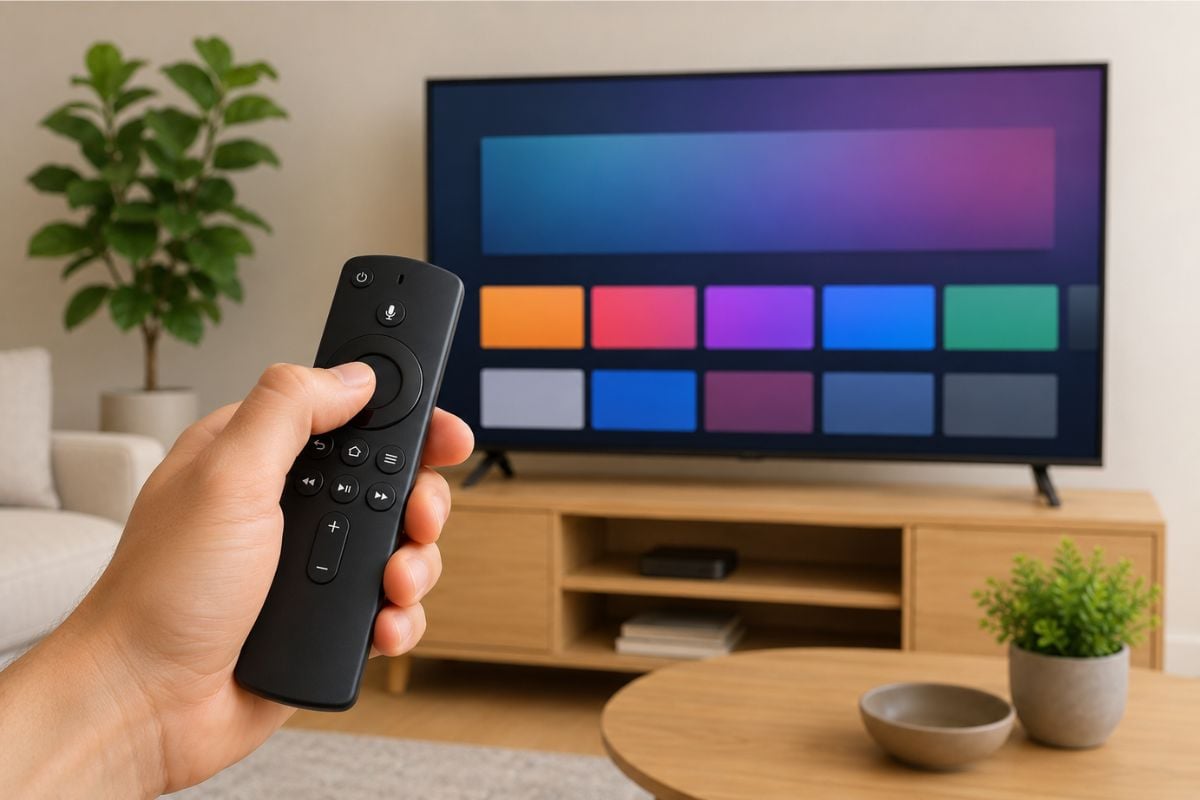
If your Firestick remote stopped working, the fastest fix is usually to reset the Firestick remote and pair it again.
Quick Answer: How to Reset Firestick Remote
To reset a Firestick remote, unplug the Fire TV Stick from power and wait 60 seconds. Then hold Left + Menu + Back on the remote for about 12 seconds. Remove the batteries, plug the Firestick back in, put the batteries back, and press Home for 10 seconds to pair it again.
Use the steps below if your Fire TV remote is not responding, not pairing, or blinking orange.
Fast Fix Box: Reset Firestick Remote in 2 Minutes
Try this first:
- Put in new batteries.
- Unplug the Firestick from power.
- Wait 60 seconds.
- Hold Left + Menu + Back for 12 seconds.
- Let go and wait 5 seconds.
- Remove the batteries.
- Plug the Firestick back in.
- Wait for the Fire TV screen.
- Put the batteries back in.
- Press and hold Home for 10 seconds.
That is the main Firestick remote reset process.
Before You Reset: Check These First
Before you do a full reset, check the easy things.
- First, replace the batteries. Do not just switch them around. Use a fresh pair.
- Next, make sure the Firestick has power. If your Firestick is plugged into the TV’s USB port, try the wall power adapter instead.
- Then move close to the TV. Stand within a few feet of the Firestick while you pair the remote.
If your Fire TV Stick is new or you are not sure it was set up correctly, this guide walks through the full setup process.
How to Reset Firestick Remote Step by Step
Use these steps if your Fire TV remote is not responding.
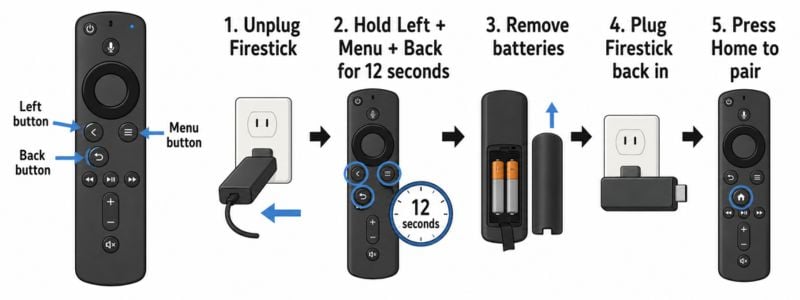
These reset steps follow Amazon’s official Fire TV remote troubleshooting instructions.
Step 1: Unplug the Firestick
Unplug the Fire TV Stick from power. Wait 60 seconds.
Step 2: Hold the reset buttons
Press and hold these three buttons at the same time:
- Left
- Menu
- Back
Hold them for about 12 seconds.
Step 3: Let go and wait
Let go of the buttons.
Wait 5 seconds.
Step 4: Remove the batteries
Take the batteries out of the remote.
Step 5: Plug the Firestick back in
Plug the Firestick back into power. Wait for the Fire TV screen to appear.
Step 6: Put the batteries back in
Put the batteries back into the remote.
Step 7: Pair the remote again
Press and hold the Home button for about 10 seconds. This should reconnect the remote.
How to Pair a Firestick Remote Again
Sometimes the reset works, but the remote still needs to pair again.
To pair a Firestick remote:
- Turn on the TV.
- Go to the Fire TV screen.
- Stand close to the Firestick.
- Press and hold Home for 10 seconds.
- Wait for the remote to connect.
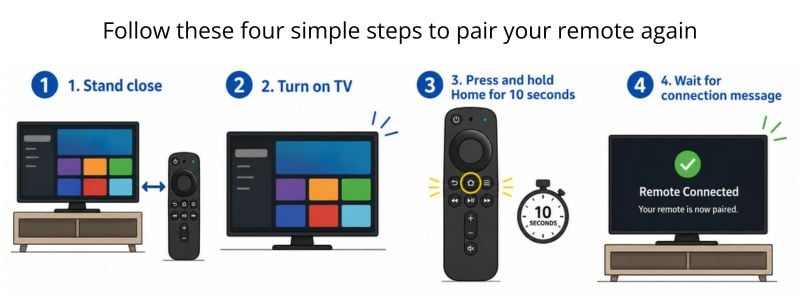
This is also called Fire Stick remote control sync.
If you use a Firestick on an older TV, this guide explains how streaming works on a non-smart TV.
Firestick Remote Not Pairing
If your Firestick remote is not pairing, try these fixes in order.
Use fresh batteries
Weak batteries are one of the top reasons a Firestick remote will not pair.
Move closer
Stand close to the Firestick. Do not try to pair it from across the room.
Restart the Firestick
Unplug the Firestick for 60 seconds. Plug it back in and try pairing again.
Hold Home longer
Hold the Home button for at least 10 seconds.
Remove extra remotes
If many remotes or controllers are already paired, remove one if you can. If none of this works, the remote may be damaged.
Firestick Remote Blinking Orange
A Firestick remote blinking orange usually means the remote is not paired with the Fire TV device.
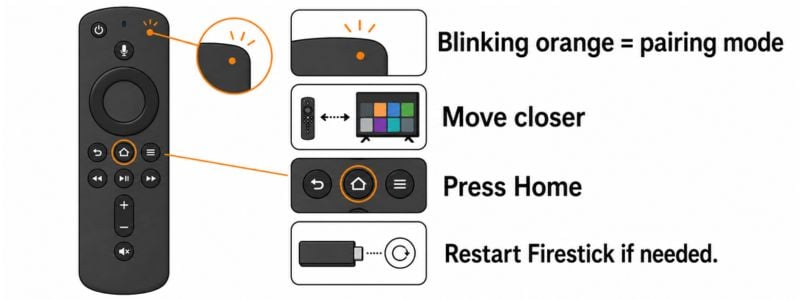
Try this:
- Move close to the Firestick.
- Press and hold Home for 10 seconds.
- Wait for the remote to connect.
- If it still blinks orange, restart the Firestick.
- Then do the full Firestick remote reset again.
Do not keep pressing random buttons. That usually does not help.
Fire TV Remote Not Responding
If your Fire TV remote is not responding at all, use this checklist:
- Try new batteries.
- Unplug the Firestick for 60 seconds.
- Reset the remote.
- Pair the remote again.
- Move closer to the Firestick.
- Make sure the Firestick has wall power.
- Try the Fire TV app as a backup.
If the remote still does nothing, it may need to be replaced.
Common Reasons Your Firestick Remote Stops Working
A Firestick remote usually stops working because of weak batteries, lost pairing, low Firestick power, or a frozen Fire TV Stick. Start with the reset steps first. If the remote still does not work, then check these causes one by one.
That keeps the post focused on the fix, but still covers helpful context.
Can You Reset Firestick Using the Remote?
Some people search for how to reset Firestick using remote or how to reset Firestick from remote, but this can mean two different things.
If you want to reset the Firestick remote, use the Left + Menu + Back button method above.
If you want to restart the Firestick device and your remote still works, you can do it from the TV screen:
- Go to Settings.
- Choose My Fire TV.
- Choose Restart.
If the remote is frozen, blinking orange, or not pairing, do not start with the menu. Unplug the Firestick from power and do the full remote reset instead.
Firestick Remote Won’t Control Volume
If your Firestick remote won’t control volume, the remote may still be working. The TV control setting may just need to be fixed.
Try this:
- Go to Settings.
- Choose Equipment Control.
- Choose Manage Equipment.
- Choose TV.
- Run the TV setup again.
Also check your remote. Some older Firestick remotes do not have volume buttons.
If TV voices are hard to hear after your remote is working again, this guide will walk you through how to adjust the settings on your TV.
Use the Fire TV App If the Remote Still Will Not Work
If the remote still does not work, you can try the Fire TV app on your phone. This can help you control the Firestick while you fix the remote.
The phone and Firestick usually need to be on the same Wi-Fi network.
Use the app as a backup, not your first fix.
When to Replace a Firestick Remote
You may need a new remote if:
- It will not pair
- It will not reset
- It has water damage
- Buttons are stuck
- It only works sometimes
- New batteries do not help
If that happens, replacing the remote may be faster than fighting with it.
If you are deciding whether Firestick or Roku is easier to use, this comparison of the two devices may help.
Frequently Asked Questions
How do you reset Firestick remote?
Unplug the Firestick for 60 seconds. Then hold Left + Menu + Back for about 12 seconds. Remove the batteries, plug the Firestick back in, put the batteries back, and press Home to pair it again.
How to reset a Fire Stick remote control?
To reset a Fire Stick remote control, use the button reset method. Hold Left + Menu + Back for about 12 seconds, remove the batteries, restart the Firestick, then pair the remote again with the Home button.
Why is my Firestick remote not pairing?
Your Firestick remote may not be pairing because the batteries are weak, the Firestick froze, the remote lost its connection, or the remote is too far from the device.
What does Firestick remote blinking orange mean?
A Firestick remote blinking orange usually means the remote is not paired with the Fire TV device. Hold the Home button for 10 seconds to pair it again.
Why is my Fire TV remote not responding?
A Fire TV remote may stop responding because of dead batteries, a frozen Firestick, a lost Bluetooth connection, or a damaged remote.
Can I reset Firestick using remote?
Yes, if the remote still works, you can restart the Firestick from the settings menu. But if the remote is not working, unplug the Firestick from power and reset the remote instead.
Why won’t my Firestick remote control volume?
If your Firestick remote won’t control volume, the TV control setup may need to be run again under Settings > Equipment Control > Manage Equipment > TV.
Do I need a new Firestick remote?
You may need a new Firestick remote if fresh batteries, reset steps, and pairing steps do not work.
Wrap Up
If your Firestick remote stops working, start with the simple fixes first. Put in new batteries, restart the Firestick, reset the Firestick remote, and pair it again with the Home button.
Most Fire TV remote problems are pairing problems, not broken remote problems.
If the remote still will not respond after all these steps, replacement is probably the next best move.