How to Watch Classic TV on Internet Archive Website

You can watch classic TV on Internet Archive by searching for shows and streaming them for free in your browser. No signup or app is required.
Looking for vintage TV shows you can watch for free without installing anything? The Internet Archive is one of the best hidden treasures online.
The Archive is filled with old TV episodes, commercials, news reels, and even entire series — all available to stream with just a few clicks. I promise you, once you land here it’ll be hard to leave!
This guide shows you exactly how to watch classic TV on Internet Archive, what to click, and how to save what you like. It’s perfect for anyone who enjoys shows from the 1960s and 1970s — especially if you’re curious, nostalgic, or just want something free and easy to watch.
Prefer to watch Internet Archive shows on a real TV (not just your computer)? Check out our big-picture list of the easiest places to stream classic television shows – and they’re free!
How to Watch Classic TV on Internet Archive (Quick Steps)
Then:
- Go to archive.org on you phone, tablet or computer
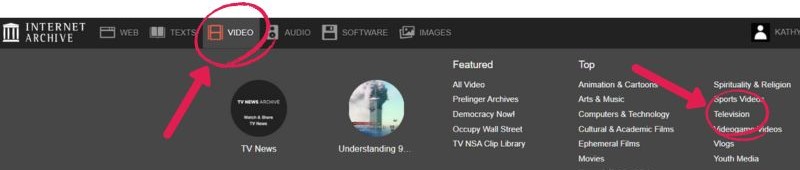
- Click Video → Television
- Search your show (e.g., “Dragnet”)
- Filter by “Movies” and “Television”
- Click and play instantly
What Is Internet Archive?
Internet Archive is a free online library that stores public domain TV shows, movies, and videos. It works in a browser, not an app, and lets you stream or download classic television without a subscription.
This massive free digital library stores old websites, books, movies, music, and television — including rare or public domain shows from the early days of TV.
Unlike streaming app like Tubi or Pluto TV, Internet Archive is more like an online museum that you access from your desktop, laptop, tablet or mobile phone — and if you know where to look, there’s gold inside.
???? For more free ways to find and watch old shows, be sure to check out my Start Watching Classic TV guide.
Where do the shows come from?
Most classic TV shows on the Internet Archive were uploaded by collectors, researchers, archivists, and fans. Some are pulled from old tapes, DVDs, or public domain archives. Others are donated by universities or TV history projects.
Anyone with a free account can upload a video — but it must follow the Archive’s rules. Uploads must be copyright-free (public domain), open-licensed, or submitted with permission from the rights holder.
How Do You Find Shows on Internet Archive?
Method 1
Go to archive.org and Locate the Search Bar
Type archive.org into your browser and press Enter. You’ll land on the Archive’s homepage.
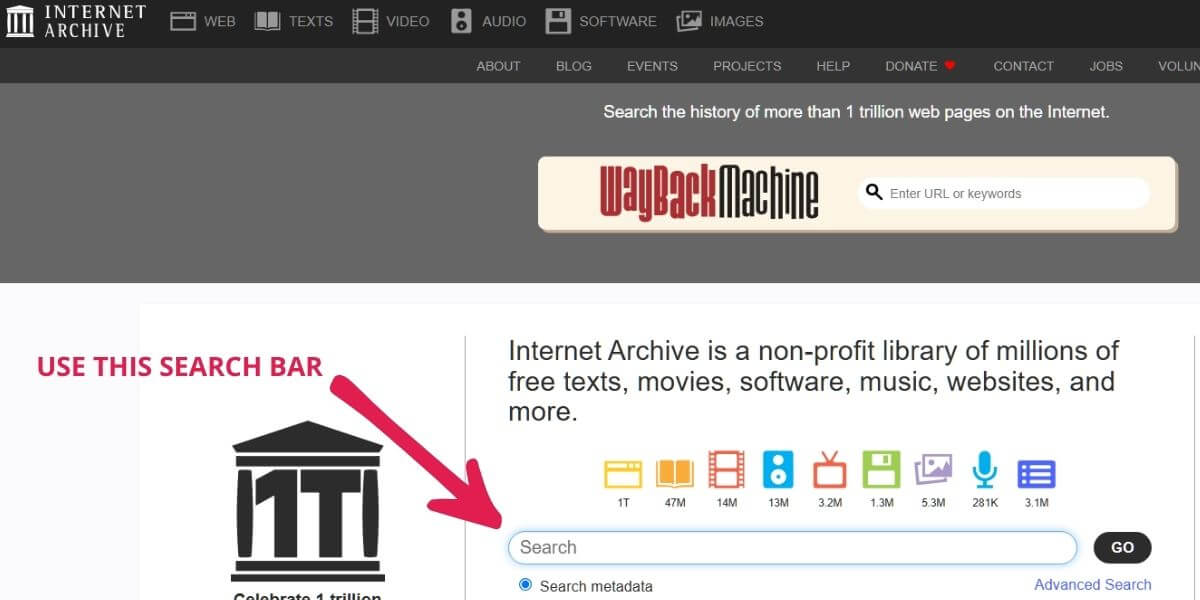
At the top of the page you’ll see a “Wayback Machine” search box — that’s for finding old versions of websites, not TV shows. For classic TV, use the main site search (or click Video first, then filter results
Use the Search Bar to Find Content
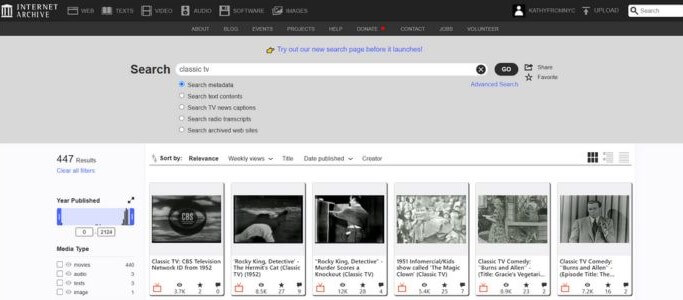
Type in the name of a specific show — or just “classic TV” or “vintage television” — and press Enter.
Some good starter searches:
- “Dragnet full episodes”
- “Classic television”
- “The Beverly Hillbillies”
- “Public domain TV shows”
Filter Your Results
After searching, you’ll get a long list of results — some video, some audio, some books. To focus only on videos:
- Look at the left-hand sidebar
- Under Media Type, click Movies — there is no option for TV
- Continue scrolling on that left sidebar. Under Collection, you can click “Television,” “Classic TV,” or a specific genre like “Sitcoms” or “Public Access Television”
- On the way to Collection, you’ll also notice an option to select one or more years
- The results appear in that main window. Just click on a show and start watching.
I like to filter by Television, then narrow it to random months and years. One afternoon I was watching The Graduate and stumbled onto a What’s My Line? episode from February 1954—with Lucille Ball as the mystery guest. That alone felt like a little gift.
Then the first guest signed in on the chalkboard. Her name started with a capital F—written in that odd, old-fashioned cursive, almost like a backwards F. It looked strange in today’s non-script world, but I remember tracing that letter over and over in second grade. What a pain.
And yes—the commercial at the end was for a “man-sized” Remington shaver, all bold claims and shiny chrome. The perfect anachronistic bookend.
Quick summary of the best ways to search:
- Use quotes: “The Twilight Zone”
- Try broad terms: “classic TV” or “1950s television”
- Filter by Television collection
- Sort by Views to find better uploads
Method 2
Alternate (if you prefer browsing)
At the top of the page, click Video (film-strip icon), then choose Television. From there, use the left sidebar filters (year, collection) to narrow down results.
How do you know which shows are good quality?
Internet Archive video quality varies because content is uploaded by different users. Choosing the right version makes a big difference.
Look for:
- Clear titles and descriptions
- Higher view counts
- MP4 format files
- Visible thumbnails
- Positive comments or reviews
If one version looks poor, try another upload of the same show.
Bonus Tip: Sort Results by Views or Relevance
After you search, you can adjust how results are shown:
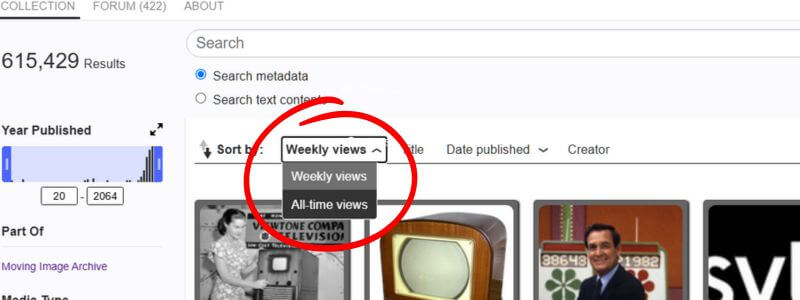
- Look just above the list of search results
- Find the dropdown menu that says “Sort by”
- Choose “Views” to see the most popular uploads first
- You can also try “Title” (alphabetical) or “Date archived” if you’re looking for the newest uploads
This helps you find what other viewers are actually watching — and avoid low-quality or mislabeled videos.
Can You Save or Keep Track of Shows on Internet Archive?
Yes — the easiest way is to create a free Internet Archive account and use the heart icon to save favorites.
How to Save a Show (The Right Way)
- Go to archive.org and sign up for a free account
- When you find a show you like, click the heart icon below the video
- That show is now saved to your Favorites
How to Find Your Saved Shows Later
- Click your username in the top right
- Select “My Library”
- Click the “Favorites” tab — everything you hearted will be there
Tips for Better Searching
- Put quotation marks around a show title: “The Twilight Zone”, “Topper.”
- Use broader searches if you’re not looking for a specific show, like “1960s television” or “black and white TV shows”
- Try combining terms: “public domain TV sitcom” or “vintage western series”
- Browse user-created collections — some are sorted by genre or decade
- Use the year filter in the sidebar to narrow results (helpful if you’re looking for 1950s only)
???? If typing on a TV remote drives you crazy, it’s often easier to search on your phone and send the video to the big screen.
What Else Can You Watch Besides Full Shows?
Once you start exploring the Internet Archive, you’ll quickly find it’s more than just sitcoms and dramas. You can also uncover vintage clips that never made it to modern streaming apps.
Here are a few things worth searching for:
- Public service announcements — quirky, serious, and often unintentionally funny
- Old news reels — wartime coverage, moon landings, and election night broadcasts
- Test patterns and TV sign-offs — remember when stations went off-air?
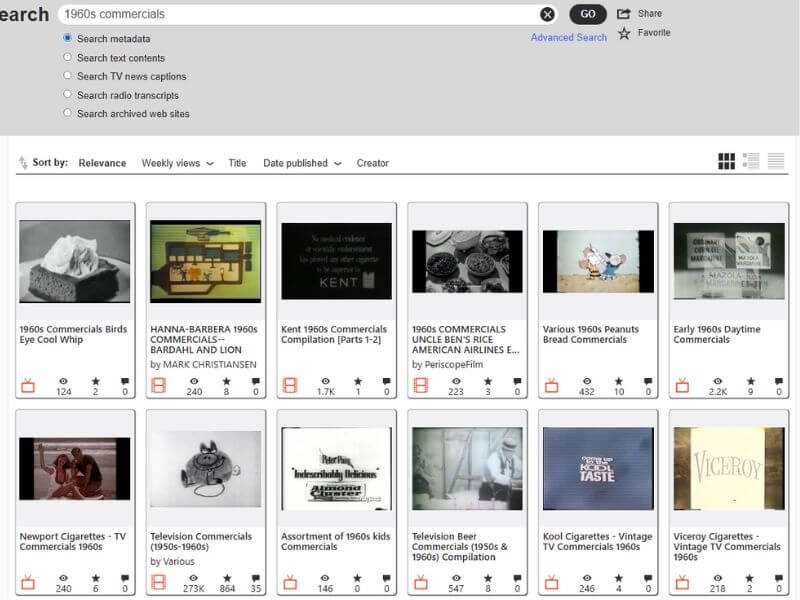
- 1960s–70s commercials — from Viceroy cigarettes to Cool Whip
If you want classic shows that behave more like a normal streaming app (cleaner menus, less digging), Pluto is the easiest place to start.
Watch Classic TV for Free With an Antenna (No Internet Needed)
Not all classic TV comes from streaming apps.
Many well-known vintage shows from the 1950s, 60s, and 70s still air today on free over-the-air TV channels like MeTV, Antenna TV, Cozi TV, and similar networks.
These channels can be watched using a simple TV antenna — no cable bill, no internet connection, and no monthly fees.
What you can receive depends on where you live and how close you are to local broadcast towers, but many people are surprised by how many classic-TV channels are available for free.
If you’re curious what stations you might be able to receive in your area, this guide to what channels you can get with an antenna explains it clearly.
This option works especially well for viewers who prefer live TV, don’t want to manage streaming apps, or simply enjoy turning on the television and watching what’s on — the way it used to be.
What to Do If a Video Won’t Play
Not every video on the Internet Archive streams perfectly — and that’s okay. If one won’t play or seems stuck, here’s what to try:
- Refresh the page — sometimes that’s all it takes
- Try a different browser — Chrome or Firefox usually work best
- Scroll down and download the MP4 — click “MP4” under Download Options to save and play it offline
If one version doesn’t work, there may be a better-quality version uploaded elsewhere on the Archive — try a slightly different search or look at other results with similar names.
If voices are hard to hear
Some Archive uploads are older transfers, so dialogue can sound a little muffled. If voices sound muddy or buried under music, these free TV settings fixes can make dialogue dramatically clearer.
Best Shows to Watch on Internet Archive Right Now
If you’re just getting started, here are a few well-loved vintage shows and series you can look up right now:
- The Dick Van Dyke Show
- Get Smart
- Monty Python’s Flying Circus
- The Andy Griffith Show
- Columbo
- Bonanza
- The Avengers
- The Green Hornet
- Dragnet
- The Man from Uncle
- Outer Limits
- Perry Mason
- Twilight Zone
and many more iconic shows.
Or select by decade such as Shows of the 70’s where I sometimes go to catch up with all time faves like Fawlty Towers and The Bob Newhart Show.
Can You Watch on a Tablet or Smart TV?
Yes — Internet Archive plays on tablets, laptops, and most phones in a regular web browser.
If you want to watch on a real TV (Roku, Fire Stick, Smart TV, casting, HDMI), use my step-by-step TV guide here.
Watch more classic shows from the 60s and 70s if you have a simple Roku device — our Roku stick setup guide shows you exactly how to get it installed fast.
When Internet Archive Isn’t the Best Option
You may want a different option if:
- Videos are grainy, cut off, or incomplete → try YouTube
- You want a simple, app-style experience → use Pluto TV
- You prefer live channels instead of searching → use an antenna
- You don’t want to dig through results → use Tubi
If you want live classic channels, see what channels you can get with an antenna.
Frequently Asked Questions
Do I need to create an Internet Archive account?
No. You can watch and download shows without signing in. It’s completely free and open to everyone. But if you decide you want to save a show for future viewing, you will need to have an account. It’s simple to create and it’s free.
Can I download a full series?
Sometimes. If a collection includes all the episodes, you can download them one by one — or use a bulk download tool if you’re comfortable with that. Look for pages that include multiple files under the Download Options list.
What kind of shows are available?
Most shows on Internet Archive are in the public domain or were uploaded by users with permission. You’ll find:
1960s and 70s variety shows and sitcoms
Early sci-fi and westerns
Educational programs
Variety and public access shows
Classic commercials and news clips
Can you upload a show?
Yes — if you own the rights or the show is in the public domain. You’ll need to create a free account and follow the Archive’s upload process. They’ll ask you to describe the show and select license information. (Most users don’t need to do this — but it’s there if you have something to share.)
Wrap Up
If you love classic TV, don’t skip the Internet Archive.
It’s not fancy, but it’s packed with treasures you won’t find on Tubi, Pluto, or YouTube — and it’s completely free.
Once you get used to the layout, it becomes easy to explore. Try searching by actor, show title, or even decade — and keep an eye out for old commercials and rare broadcasts while you’re at it.
Want to go deeper?
- If Tubi is new to you, here’s the quickest way to add it on Roku so you can dive in right away.”
- For shows that pop up in full episodes from studio channels, this YouTube guide shows what to look for.
Want to compare all your options? Start with Watch Old TV Shows for Free — Starting Tonight! More TV magic is just a few clicks away.
Sources & Verification
All platforms and resources linked in this guide are legal, free-with-ads services or nonprofit organizations. Each offers legitimate access to classic TV shows.
???? Tubi – About Us
Learn how Tubi offers free, legal streaming supported by short ads to over 97 million monthly users.
???? Pluto TV – Help Center
Official support and information about Pluto TV’s free live channels and on-demand classic shows.
???? YouTube – Verified Channels
How to identify official studio channels and verified creators uploading classic TV content.
???? Internet Archive – About
Learn how the nonprofit Internet Archive preserves and provides free access to public-domain television.
⚖️ U.S. Copyright Office – Public Domain
Understand what “public domain” means and how it applies to older television broadcasts.